Tesla Firmware 2024.44.25.3 (Bug Fix Update)
新功能

Apple Watch
Included in 2024.44.25.3
Tesla for Apple Watch allows you to pair your watch as a key and unlock and lock your vehicle without ever pressing a button - just like phone key. You can also see the state of your vehicle's battery with a watch face complication and perform actions such as opening the frunk or trunk.
Requires mobile app version 4.39.5+ and watchOS 11.0.

Mobile App Dashcam Viewer
Included in 2024.44.25.3
Watch and save Dashcam and Sentry Mode clips directly from your phone. First, ensure the View Camera via Mobile App setting on the touchscreen is enabled (Controls > Safety). Then, on your mobile app, go to Security > Dashcam Viewer. Clips are end-to-end encrypted and can't be accessed by Tesla.
This feature requires iOS mobile app version 4.39.5 or higher, and Premium Connectivity.

Auto Shift (Beta)
Included in 2024.44.25.3
To assist with reversing out of a parking spot, parallel parking, multipoint turns, and similar driving maneuvers, Auto Shift (Beta) can now also shift between Drive and Reverse, in addition to shifting out of Park.
Auto Shift (Beta) assists you with shifting without using the touchscreen based on your surroundings. Go to Controls > Dynamics > Auto Shift (Beta).
This feature is designed to enhance your driving experience and may only be available in certain circumstances. Drivers must remain attentive at all times.

SiriusXM
Included in 2024.44.25.3
SiriusXM offers an extensive and personalized audio experience. Get access to all your favoritesfrom ad-free music, talk and news to sports, comedy, and other exclusives in your vehicle and on your phone. Tap the SiriusXM icon from the App Launcher to start your free trial.
Requires Premium Connectivity or a Wi-Fi connection.

Set Arrival Energy
Included in 2024.44.25.3
You can now set a preferred battery charge level for when you arrive at your destinationhigher if youd like more charge, or lower if you prefer a faster arrival. Trip Planner will adjust your route accordingly, adding or modifying recommended charging stops and durations.
In your vehicles turn-by-turn list, choose Set Arrival Energy for your final destination.
Search Along Route
Included in 2024.44.25.3
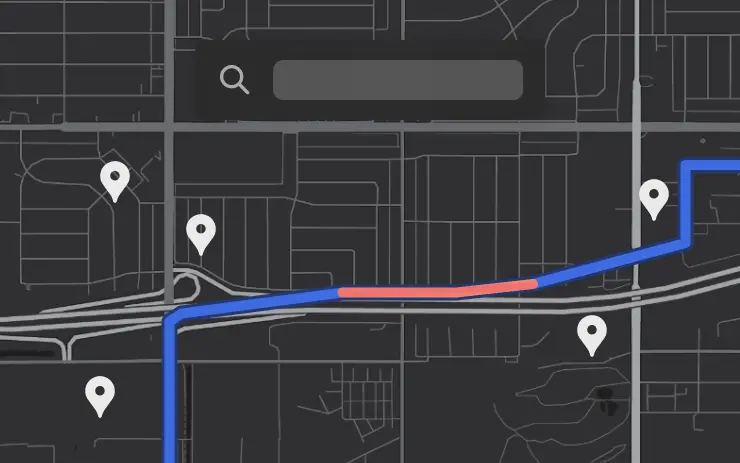
While navigating, when you search for a location (like coffee shops, fast food, or other stops), the results are now filtered to show options along your route. Each result also includes an estimated detour time.
Precipitation Map and Weather at Destination
Included in 2024.44.25.3
You can now view precipitation in your area directly on your vehicles map. Additionally, while navigating, you can see the destinations weather in the weather popup. You will also be updated on any significant weather differences between your current location and final destination.
Requires Premium Connectivity.

Rear Cross Traffic Alert
Included in 2024.44.25.3
When you shift into Reverse, your vehicle will alert you if it detects a pedestrian or vehicle crossing behind you by highlighting the corresponding side of the rear-view camera feed in red.

TuneIn
Included in 2024.44.25.3
Explore the all-new TuneIn Radio on Tesla still completely free with no setup needed. Start enjoying over 100,000 music, sports, news & talk radio stations, along with 3 million podcasts, audiobooks, and more. TuneIn now features a redesigned personalized interface per driver profile, improved support for sports and podcasts, and richer station profiles.
Requires Premium Connectivity or a Wi-Fi connection.

Light Show Update
Included in 2024.44.25.3
Time to celebrate with the latest Light Shows to the tune of Cyber Symphony by Lionel Yu and Ready for Assault by Evgeny Bardyuzha. You can play the show instantly or schedule it up to 10 minutes in advance, either on a single vehicle or synced with friends.
Light Show enthusiasts can control interior lighting, add display color effects, and create longer custom shows. To play a custom show, save the show files in a "LightShow" folder on your flash drive, connect, and select.
Start the show from your mobile app (version 4.39.5+ required) or go App Launcher > Toybox > Light Show on your vehicle's touchscreen.

Boomerang Fu
Included in 2024.44.25.3
Slice and dice your friends with boomerangs in this frantic physics party game. Join a crew of your favorite foods as you grill, chill and spill your enemies. Discover ridiculous power-ups and stack them together in deadly combinations. To play, shift into Park (P), and go to App Launcher > Arcade > Boomerang Fu.

Theater and Video Updates
Included in 2024.44.25.3
- Interact with the rear Theater from the front screen while driving to edit playlists or pause videos.
- Use the media card to play and pause any active video content playing through the browser or Theater.
- Start a video in the web browser before your drive to enjoy your favorite content as audio on the road.

Seats Control
Included in 2024.44.25.3
The new Seats control panel allows you to adjust the position of the unoccupied passenger seat. Go to Controls > Seats.

Maintenance Summary
Included in 2024.44.25.3
This feature provides a record of when common maintenance actions were last performed and recommends when to perform them next. Maintenance records persist on the vehicle through factory resets, providing a record of previously performed maintenance actions for current and future owners. Go to Controls > Service > Maintenance.

Minor Updates
Included in 2024.44.25.3
- Tap Nearby Parking on any point-of-interest page to get directions to nearby parking and start your journey with ease.
- Navigation will now dynamically route around road closures and display them along an affected route when they are detected by the fleet.
- If someone attempts to open the door or trunk while Sentry Mode is active, youll receive a notification on your mobile app.
- When reviewing Dashcam clips in your vehicle, the video player will skip directly to the recorded event.
- The Energy app's Consumption page has been updated to let you view your energy usage over the last 200 miles.
- Experience Rainbow Road inside the cabin with accent lighting. Go to App Launcher > Toybox > Rainbow Road.
- When navigating to a Supercharger, upon arrival you will be notified on the touchscreen of any stalls that are currently out of service.
- While reversing, your music volume can automatically lower to help you focus on parking. Go to Controls > Safety > Lower Volume in Reverse.
- Vampire Survivors has been updated to "Ode to Castlevania", adding new quality of life features and performance improvements.
- Minor fixes and performance enhancements have been applied.

小修小补
包括 2024.44.48.2
此版本包含小修复和改进

苹果手表
包括 2024.44.25.4
特斯拉 Apple Watch 可让您将手表配对为钥匙,无需按任何按钮即可解锁和锁定车辆,就像手机钥匙一样。你还可以通过手表表面的复杂功能查看车辆电池的状态,并执行打开行李箱或后备箱等操作。
需要手机 app 4.39.5 及以上版本和 watchOS 11.0。

移动应用程序监控录像查看器
包括 2024.44.25.4
直接从手机观看并保存 Dashcam 和 Sentry Mode 片段。首先,确保触摸屏上的 "通过移动应用程序查看摄像头 "设置已启用(控制 > 安全)。然后,在您的移动应用程序上,转到安全 > Dashcam Viewer。短片经过端到端加密,特斯拉无法访问。
此功能需要 iOS 移动应用程序 4.39.5 或更高版本,以及高级连接功能。

设置到达能量
包括 2024.44.25.4
现在,您可以为到达目的地时的电池电量设置一个首选电量--如果您希望获得更多电量,可以设置较高的电量;如果您希望更快到达目的地,可以设置较低的电量。行程规划器会相应调整路线,增加或修改推荐的充电站点和充电时间。
在车辆的转弯列表中,为最终目的地选择 "设置到达能量"。

沿途搜索
包括 2024.44.25.4
在导航过程中,当您搜索某个地点(如咖啡店、快餐店或其他站点)时,搜索结果现在会经过过滤,以显示沿途的选项。每个结果还包括预计绕行时间。

目的地降水量地图和天气情况
包括 2024.44.25.4
现在,您可以直接在车载地图上查看您所在地区的降水情况。此外,在导航过程中,您还可以在天气弹出窗口中查看目的地的天气情况。如果当前位置和最终目的地的天气有明显差异,您也将获得最新信息。
需要高级连接功能。

后方交通警报
包括 2024.44.25.4
当您换入倒车档时,如果车辆检测到有行人或车辆从您身后穿过,就会在后视摄像头画面的相应一侧显示红色,提醒您注意。

TuneIn
包括 2024.44.25.4
探索特斯拉上全新的 TuneIn Radio - 仍然完全免费,无需设置。开始享受 10 万多个音乐、体育、新闻和脱口秀电台,以及 300 万个播客、有声读物等。TuneIn 现在采用了重新设计的个性化界面(按驾驶员配置文件),改进了对体育和播客的支持,并提供了更丰富的电台配置文件。
需要高级连接功能或 Wi-Fi 连接。

灯光秀更新
包括 2024.44.25.4
是时候用最新的灯光秀来庆祝了!灯光秀的曲调是 Lionel Yu 的《网络交响曲》和 Evgeny Bardyuzha 的《准备突击》。您可以立即播放,也可以提前 10 分钟安排,既可以在单辆车上播放,也可以与朋友同步播放。
灯光秀 "爱好者可以控制室内灯光,添加显示色彩效果,并创建更长的自定义节目。要播放自定义表演,只需将表演文件保存在闪存盘上的 "LightShow "文件夹中,然后连接并选择。
通过手机应用程序(要求 4.39.5 以上版本)或车载触摸屏上的 "应用程序启动器">"玩具箱">"灯光秀 "启动灯光秀。

Boomerang Fu
包括 2024.44.25.4
在这款疯狂的物理派对游戏中,用回旋镖将朋友们切成薄片。加入你最喜爱的食物团队,烧烤、冷冻并泼洒你的敌人。发掘令人啼笑皆非的强力道具,并将它们叠加在一起,形成致命组合。要进行游戏,请切换到 Park (P),然后进入 App Launcher > Arcade > Boomerang Fu。

影院和视频更新
包括 2024.44.25.4
- 使用媒体卡播放和暂停通过浏览器或影院播放的任何活动视频内容。
- 开车前在网络浏览器中启动视频,在路上以音频的形式欣赏您喜爱的内容。

座椅控制
包括 2024.44.25.4
新的 "座椅 "控制面板允许您调整无人驾驶乘客座椅的位置。转到 "控制">"座椅"。

维护概要
包括 2024.44.25.4
该功能可记录上次执行常见维护操作的时间,并建议下次执行的时间。维护记录在出厂重置后仍会保留在车辆上,为当前和未来的车主提供以前执行的维护操作记录。转到控制 > 服务 > 维护。

小更新
包括 2024.44.25.4
- 在任何兴趣点页面上轻点 "附近的停车场",即可获得附近停车场的指示,轻松开始旅程。
- 没有高级连接功能的车辆现在可以看到导航路线上的交通情况。
- 如果有人试图在 "哨兵模式 "激活时打开车门或后备箱,您的手机应用会收到通知。
- 查看车载 Dashcam 片段时,视频播放器会直接跳到录制的事件。
- 能源应用程序的 "消耗 "页面已更新,您可以查看最近 200 英里的能源使用情况。
- 在导航至超级充电站时,到达后触摸屏上会显示当前停止服务的停机位。
- 当自动引导功能激活时,一个新的指示灯将显示哪些车道可用于自动变道。
- 倒车时,音乐音量会自动降低,以帮助您专注于泊车。转到控制面板 > 安全 > 降低倒车音量。
- 吸血鬼幸存者》已经更新,增加了新的生活质量功能并改进了性能。
- 已应用小的修复和性能增强功能。

改善寒冷天气
包括 2024.44.1
电池预处理得到改进,超级充电性能更佳,超级充电期间和之后的挡风玻璃自动除雾效果也更好。

适合拖车的增压器
包括 2024.44.1
现在您可以查看超级充电站是否有与拖车兼容的停车位。轻按地图上超级充电器位置的图钉,即可查看该位置是否支持拖车。如果您的车辆处于拖车模式,适合拖车的超级充电站位置会出现在列表顶部。

Spotify 免费
包括 2024.38.4
听众现在可以在特斯拉汽车上使用 Spotify,而无需 Spotify Premium 计划。免广告收听、播放列表预览和无限制跳过功能仍为 Spotify Premium 会员专享。需要高级连接或 WiFi 连接。

定制镜面倾斜位置
包括 2024.38.4
现在您可以为倒车时的外后视镜设置自定义倾斜位置。要设置自定义倾斜位置,请导航至控制 > 后视镜 > 调整倾斜位置。根据需要调整后视镜,然后按保存。后视镜自动倾斜必须启用。
Minor Fixes
Included in 2024.44.58.7
This release contains minor fixes and improvements

Apple Watch
Included in 2024.44.25.4
Tesla for Apple Watch allows you to pair your watch as a key and unlock and lock your vehicle without ever pressing a button - just like phone key. You can also see the state of your vehicle's battery with a watch face complication and perform actions such as opening the frunk or trunk.
Requires mobile app version 4.39.5+ and watchOS 11.0.

Mobile App Dashcam Viewer
Included in 2024.44.25.4
Watch and save Dashcam and Sentry Mode clips directly from your phone. First, ensure the View Camera via Mobile App setting on the touchscreen is enabled (Controls > Safety). Then, on your mobile app, go to Security > Dashcam Viewer. Clips are end-to-end encrypted and can't be accessed by Tesla.
This feature requires iOS mobile app version 4.39.5 or higher, and Premium Connectivity.

Set Arrival Energy
Included in 2024.44.25.4
You can now set a preferred battery charge level for when you arrive at your destinationhigher if youd like more charge, or lower if you prefer a faster arrival. Trip Planner will adjust your route accordingly, adding or modifying recommended charging stops and durations.
In your vehicles turn-by-turn list, choose Set Arrival Energy for your final destination.

Search Along Route
Included in 2024.44.25.4
While navigating, when you search for a location (like coffee shops, fast food, or other stops), the results are now filtered to show options along your route. Each result also includes an estimated detour time.

Precipitation Map and Weather at Destination
Included in 2024.44.25.4
You can now view precipitation in your area directly on your vehicles map. Additionally, while navigating, you can see the destinations weather in the weather popup. You will also be updated on any significant weather differences between your current location and final destination.
Requires Premium Connectivity.

Rear Cross Traffic Alert
Included in 2024.44.25.4
When you shift into Reverse, your vehicle will alert you if it detects a pedestrian or vehicle crossing behind you by highlighting the corresponding side of the rear-view camera feed in red.

Light Show Update
Included in 2024.44.25.4
Time to celebrate with the latest Light Shows to the tune of Cyber Symphony by Lionel Yu and Ready for Assault by Evgeny Bardyuzha. You can play the show instantly or schedule it up to 10 minutes in advance, either on a single vehicle or synced with friends.
Light Show enthusiasts can control interior lighting, add display color effects, and create longer custom shows. To play a custom show, save the show files in a "LightShow" folder on your flash drive, connect, and select.
Start the show from your mobile app (version 4.39.5+ required) or go App Launcher > Toybox > Light Show on your vehicle's touchscreen.

Theater and Video Updates
Included in 2024.44.25.4
- Use the media card to play and pause any active video content playing through the browser or Theater.
- Start a video in the web browser before your drive to enjoy your favorite content as audio on the road.

Seats Control
Included in 2024.44.25.4
The new Seats control panel allows you to adjust the position of the unoccupied passenger seat. Go to Controls > Seats.

Maintenance Summary
Included in 2024.44.25.4
This feature provides a record of when common maintenance actions were last performed and recommends when to perform them next. Maintenance records persist on the vehicle through factory resets, providing a record of previously performed maintenance actions for current and future owners. Go to Controls > Service > Maintenance.

Minor Updates
Included in 2024.44.25.4
- Tap Nearby Parking on any point-of-interest page to get directions to nearby parking and start your journey with ease.
- If someone attempts to open the door or trunk while Sentry Mode is active, youll receive a notification on your mobile app.
- When reviewing Dashcam clips in your vehicle, the video player will skip directly to the recorded event.
- The Energy app's Consumption page has been updated to let you view your energy usage over the last 200 miles.
- When navigating to a Supercharger, upon arrival you will be notified on the touchscreen of any stalls that are currently out of service.
- With Autosteer active, a new telltale will indicate which lanes are available for Automatic Lane Change.
- While reversing, your music volume can automatically lower to help you focus on parking. Go to Controls > Safety > Lower Volume in Reverse.
- Vampire Survivors has been updated, adding new quality of life features and performance improvements.
- Minor fixes and performance enhancements have been applied.
Cold Weather Improvements
Included in 2024.44.1
Battery preconditioning has been improved for better Supercharging performance as well as better automatic windshield defogging during and after Supercharging.

Trailer-Friendly Superchargers
Included in 2024.44.1
You can now see whether a Supercharger has trailer-compatible stalls. Tap a Supercharger location's pin on the map to see whether it is trailer-friendly. If your vehicle is in Trailer Mode, trailer-friendly Supercharger locations appear at the top of the list.

Spotify Free
Included in 2024.38.4
Listeners can now use Spotify on their Tesla vehicle without a Spotify Premium plan. Ad-free listening, playlist previews, and unlimited skips remain exclusive to Spotify Premium members. Requires Premium Connectivity or a WiFi connection.
Custom Mirror Tilted Positions
Included in 2024.38.4
You can now set a custom tilt for your exterior mirrors for when the vehicle is in Reverse. To set custom tilt positions, navigate to Controls > Mirrors > Adjust Tilted Position. Adjust the mirror as needed and press save. Mirror Auto Tilt must be enabled.

ASS (Actually Smart Summon)
Included in 2024.44.3
Buckle up for the ride of your life, except, surprise! You're not in the car. ASS (Actually Smart Summon) allows your vehicle to come to you, or head to a spot that you choose, all on its own. Its like magic, but with more tech and less wand-waving.
Additionally, Dumb Summon allows you to move your Tesla forward or back with simple controls directly in your mobile app.
To use, open your Tesla app, hit the Summon tab, and get a live feed from your cars cameras to guide your supervision.
- COME TO ME: Press and hold to have your Tesla come to you.
- GO TO TARGET: Set where you want your Tesla to go, then press and hold to send it on its merry way.
You can halt your journey anytime by just letting go of the button. See your Owner's Manual for additional details.
ASS and Dumb Summon should only be used in parking lots or driveways. Keep an eye on your car and its surroundings at all times. Stay vigilant, especially around the fast and the furious (people, bikes, and other cars). You are still responsible for your vehicle, so watch as it drives and stop it if necessary.
Note: ASS requires the Tesla mobile app version 4.38.0 or later.
Now Includes:
- Public/High-Speed Roads pause your ASS maneuver
- Improved Blocked Camera Aborts
- Reduced False Positive Collision Mitigation Aborts
- Refined Dumb Summon behavior at curbs
- Added Custom/Fart Completion Sounds
Coming Soon:
- HomeLink & myQ garage integration

Autopark Improvements
Included in 2024.44.3
Your vehicle's Autopark performance and visualizations have been improved.
As with all Autopilot features, you must continue to pay attention and be ready to take immediate action including canceling Autopark.
Auto Shift (Beta)
Included in 2024.44.25.3
To assist with reversing out of a parking spot, parallel parking, multipoint turns, and similar driving maneuvers, Auto Shift (Beta) can now also shift between Drive and Reverse, in addition to shifting out of Park.
Auto Shift (Beta) assists you with shifting without using the touchscreen based on your surroundings. Go to Controls > Dynamics > Auto Shift (Beta).
This feature is designed to enhance your driving experience and may only be available in certain circumstances. Drivers must remain attentive at all times.
SiriusXM
Included in 2024.44.25.3
SiriusXM offers an extensive and personalized audio experience. Get access to all your favoritesfrom ad-free music, talk and news to sports, comedy, and other exclusives in your vehicle and on your phone. Tap the SiriusXM icon from the App Launcher to start your free trial.
Requires Premium Connectivity or a Wi-Fi connection.

Blind Spot Warning While Parked
Included in 2024.44.1
If you attempt to open a door while an approaching object is detected in your blind spot (for example, a bicyclist approaching from behind) the blind spot indicator light flashes, a chime sounds, and your door will not open upon initial button press. Wait a short time and press the button a second time to override the warning.

LiveOne Powered by Slacker Radio
Included in 2024.38.4
The Streaming app has been changed to LiveOne. To access, tap the LiveOne icon in the Application Launcher. Requires Premium Connectivity or a WiFi connection.

Weather at Destination
Included in 2024.44.25.2
While navigating, your car will display the destinations weather in the weather popup and notify you of any significant weather differences between your current location and final destination.
Requires Premium Connectivity.

FSD (Supervised) v12.5.4.2
Included in 2024.44.3
FSD (Supervised) v12 upgrades the city-streets driving stack to a single end-to-end neural network trained on millions of video clips, replacing over 300k lines of explicit C++ code.
Includes vision-based attention monitoring with sunglasses.
Upcoming Improvements:
- Earlier and more natural lane change decisions.
- End-to-End on highway.

Full Self-Driving (Supervised)
Included in 2024.44.3
Under your supervision, Full Self-Driving (Supervised) can drive your Tesla almost anywhere. It will make lane changes, select forks to follow your navigation route, navigate around other vehicles and objects, and make left and right turns. You and anyone you authorize must use additional caution and remain attentive. It does not make your vehicle autonomous. Do not become complacent.
Full Self-Driving (Supervised) is enabled on your vehicle. To use the feature, pull the drive stalk down once. You can disable Full Self-Driving (Supervised) in Autopilot Settings.

Vision-Based Attention Monitoring
Included in 2024.44.3
When Full Self-Driving (Supervised) is enabled, the driver monitoring system primarily relies on the cabin camera to determine driver attentiveness. Cabin camera must have clear visibility (e.g., camera is not occluded, eyes, arms, are visible, there is sufficient cabin illumination, and the driver is looking forward at the road). In other circumstances, the driver monitoring system will primarily rely on torque-based (steering wheel) monitoring to detect driver attentiveness.
If the cabin camera detects inattentiveness, a warning will appear. The warning can be dismissed by the driver immediately reverting their attention back to the road ahead. Warnings will escalate depending on the nature and frequency of detected inattentiveness, with continuous inattention leading to a Strikeout.
Track Mode: Powertrain Endurance
Included in 2024.38.4
You can now adjust Powertrain Endurance in Track Mode to help you achieve consistent performance for longer track sessions.
Go to Controls > Dynamics > Customize Track Mode > Powertrain Endurance.

Other Updates
Included in 2024.44.1
- Improved battery energy estimation for better accuracy while driving.
- The Battle of Polytopia - Reworked Aquarion arrives! Mermaids rule land & sea, chill with Sharks & Jellies, and uncover lost ocean cities.
- Important security enhancements and improvements are included.
- Minor fixes and performance enhancements have been applied.
錯誤修正更新
錯誤修正 2024.44.48.2
2025年6月26日
錯誤修正 2024.44.58.7
2025年3月20日
錯誤修正 2024.44.58.6
2025年3月18日
錯誤修正 2024.44.58.4
2025年3月15日
錯誤修正 2024.44.58.3
2025年3月8日
錯誤修正 2024.44.58.1
2025年2月23日
錯誤修正 2024.44.400
2025年2月20日
錯誤修正 2024.44.58
2025年2月19日
錯誤修正 2024.44.300
2025年1月28日
錯誤修正 2024.44.200
2025年1月26日
錯誤修正 2024.44.25.4.1
2025年1月5日
錯誤修正 2024.44.100.1
2024年12月24日
錯誤修正 2024.44.25.4
2024年12月22日
錯誤修正 2024.44.100
2024年12月17日
錯誤修正 2024.44.25.3
2024年12月15日
錯誤修正 2024.44.25.2
2024年12月4日
錯誤修正 2024.44.25.1
2024年12月3日
錯誤修正 2024.44.25
2024年12月2日
錯誤修正 2024.44.4
2024年12月1日
錯誤修正 2024.44.3.1
2024年11月23日
錯誤修正 2024.44.3
2024年11月19日
錯誤修正 2024.44.1
2024年11月8日
錯誤修正 2024.44
2024年11月2日


