Tesla Firmware 2025.14.1 (Bug Fix Update)
Uudet ominaisuudet
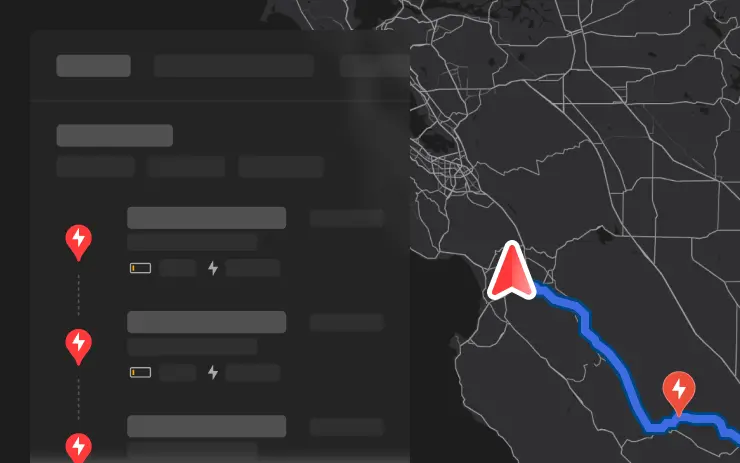
Alternative Trip Plans
Included in 2025.14.1
Multiple trip plans are now available for you to choose from, allowing you to better suit your travel needs.
- Fastest: offers the quickest route.
- Best Amenities: prioritizes stops near open and highly rated restaurants, shops, and restrooms.
- Fewer Stops: minimizes charging stops.

Avoid Highways
Included in 2025.14.1
Navigation can now avoid highways when possible, providing an alternative route that bypasses major roads.
Go to Controls > Navigation > Avoid Highways.
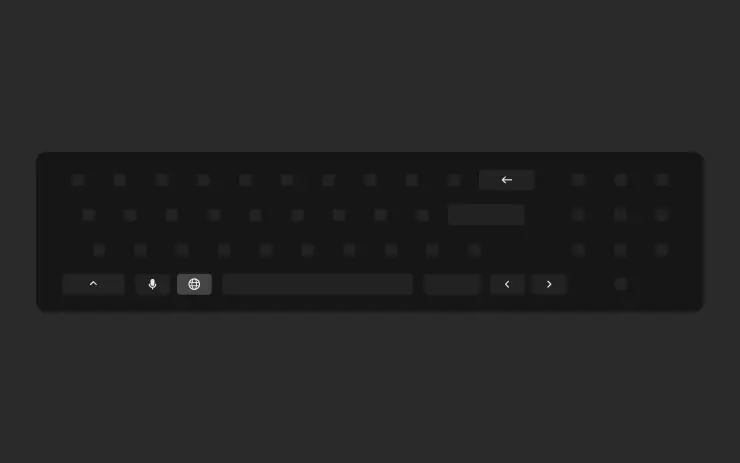
Keyboard Languages
Included in 2025.14.1
Easily switch between different language input methods on your touchscreen. To add keyboards, go to Controls > Display > Keyboards. To switch between them, long-press the global icon on your keyboard and select the desired keyboard.
Keep Accessory Power On
Included in 2025.14.1
Use or charge devices through the low voltage outlets and USB ports after exiting the vehicle, as long as the battery is above 20%.
When enabled, these ports remain powered even if you are not present, and the vehicle is not in use. Note that this may increase the vehicles power consumption, even if no device is connected.
Go to Controls > Charging > Keep Accessory Power On.
Minor Updates
Included in 2025.14.1
- When viewing a charger location page, nearby restaurants, cafes, and shops within walking distance are displayed at the bottom.
- Media search results are now filtered by sources, providing faster and more streamlined access to content.
- Easily scroll through your SiriusXM favorites by tapping the steering wheel button left or right.
- Sign in with your Amazon Music Free account. Requires Premium Connectivity or an active WiFi connection.
- You can now shuffle an entire Apple Music playlist that contains more than 100 songs.
- See what song will play next on YouTube Music playlists in the 'Up Next' view of the media player.
- In your Navigation settings, you can choose to show or hide chargers on the map that are not owned or serviced by Tesla.
- If your hotspot is enabled, it will automatically connect to your vehicle once you start driving, so you wont have to reconnect each time.
- Contact photos are now displayed for incoming calls and in the vehicle's Phone app.
- This update includes important security fixes and improvements.

Pienet korjaukset
Sisältyy 2025.14.300.1
Tämä julkaisu sisältää pieniä korjauksia ja parannuksia

FSD (valvottu) v13.2.9
Sisältyy 2025.14.6
FSD (Supervised) v13 päivittää kaikki ajoverkon osat.
Sisältää:
- 36 Hz:n, täyden resoluution AI4-videotulot
- Alkuperäiset AI4-syötteet ja neuroverkkoarkkitehtuurit
- 4.2x datan skaalaus
- 5x koulutuslaskennan skaalautuminen (Cortex-klusterin mahdollistama).
- Vähensi fotonien ja ohjauksen välistä viivettä 2x.
- Nopeusprofiilit sekä kaupungin kaduilla että valtateillä
- Integroidut pysäköinnin poisto-, peruutus- ja pysäköintiominaisuudet
- Paremmat palkitsemisennusteet törmäyksen välttämiseksi
- Parannettu kameran puhdistus
- Uudelleen suunniteltu ohjain sujuvampaa ja tarkempaa seurantaa varten.
- Dynaaminen reititys tiesulkujen ympärille, joka näyttää ne reitin varrella, kun ajoneuvokanta havaitsee ne.
Tulevat parannukset:
- 3x mallin koon skaalaus
- 3x mallin kontekstin pituuden skaalautuminen
- Äänitulot hätäajoneuvojen parempaa käsittelyä varten
- Parannetut palkitsemisennusteet navigointia varten
- Parannukset väärään jarrutukseen ja hitaampaan ajoon pysäköintialueilla
- Tukea määränpäävaihtoehdoille, kuten pysähtymiselle, pysäköinnille paikalle, ajotielle tai autotalliin pysäköinnille
- Karttojen ja navigointitietojen tehokas esittäminen
- Parannettu kameran peittymien käsittelyä

Täysi itseohjautuvuus (valvottu)
Sisältyy 2025.14.6
Täydellinen itseohjautuvuus (valvottu) voi ajaa Teslaasi sinun valvonnassasi lähes minne tahansa. Se tekee kaistanvaihtoja, valitsee haaroja noudattaakseen navigointireittiäsi, navigoi muiden ajoneuvojen ja kohteiden ohi ja kääntyy vasemmalle ja oikealle. Sinun ja kaikkien valtuuttamiesi henkilöiden on oltava erityisen varovaisia ja tarkkaavaisia. Se ei tee ajoneuvostasi autonomista. Älä tule itsetyytyväiseksi.
Täysi itseohjautuvuus (valvottu) on käytössä ajoneuvossasi. Voit käyttää ominaisuutta painamalla kerran oikeaa vierityspyörän painiketta. Voit poistaa Full Self-Driving (Supervised) -toiminnon käytöstä Autopilotin asetuksissa.

Vaihtoehtoiset matkasuunnitelmat
Sisältyy 2025.14.1
Voit nyt valita useista eri matkasuunnitelmista, joiden avulla voit mukautua paremmin matkustustarpeisiisi.
- Nopein: tarjoaa nopeimman reitin.
- Parhaat mukavuudet: asetetaan etusijalle pysäkit, jotka sijaitsevat lähellä avoinna olevia ja korkealle arvostettuja ravintoloita, kauppoja ja vessoja.
- Vähemmän pysähdyksiä: minimoi latauspysähdykset.

Vältä moottoriteitä
Sisältyy 2025.14.1
Navigointi voi nyt mahdollisuuksien mukaan välttää valtateitä ja tarjota vaihtoehtoisen reitin, joka ohittaa päätiet.
Siirry kohtaan Ohjaus > Navigointi > Vältä valtateitä.

Dashcam-päivitys ja sivukameran tallennus
Sisältyy 2025.14.1
Ajoneuvosi sivukamerat (B-pilari) tallentuvat nyt sekä Dashcam- että Sentry-leikkeisiin. Dashcam Viewer -sovellusta on myös päivitetty ruudukkonäkymällä, mikä helpottaa tallenteiden käyttöä ja tarkastelua.

Tallenna rungon korkeus sijainnin perusteella
Sisältyy 2025.14.1
Mukauta tavaratilan avautumiskorkeus ja tallenna se oletusarvoksi tai tiettyyn paikkaan, kuten autotalliin. Aseta korkeus pysäyttämällä tavaratila kosketusnäytön avulla, kun se liikkuu. Vaihtoehtoisesti voit säätää haluamallesi korkeudelle manuaalisesti ja painaa sitten tavaratilan sulkupainiketta, kunnes kuulet äänimerkin.
Jos haluat asettaa nykyisen tavaratilan aukon tehtaan oletuskorkeudelle tai poistaa kaikki tallennetut sijainnit, siirry kohtaan Ohjaus > Huolto > Poista tallennetut sijainnit.

Mukautuvat ajovalot
Sisältyy 2025.14.1
Kaukovalot mukautuvat nyt siten, että ne häikäisevät muita kuljettajia ja pyöräilijöitä vähemmän. Tunnistamalla muut tienkäyttäjät ja himmentämällä valikoivasti ajovalojen yksittäisiä pikseleitä kaukovalot pysyvät päällä useammin, mikä parantaa näkyvyyttä yöllä.
Voit ottaa ne käyttöön valitsemalla Controls > Lights > Adaptive Headlights.

Näppäimistön kielet
Sisältyy 2025.14.1
Vaihda helposti eri kielten syöttötapojen välillä kosketusnäytöllä. Voit lisätä näppäimistöjä valitsemalla Ohjaus > Näyttö > Näppäimistöt. Voit vaihtaa niiden välillä painamalla pitkään näppäimistön maailmanlaajuista kuvaketta ja valitsemalla haluamasi näppäimistön.

Pidä lisävarusteiden virta päällä
Sisältyy 2025.14.1
Käytä tai lataa laitteita matalajännitepistorasioiden, USB-porttien tai induktiivisen puhelinlaturin kautta, kun olet poistunut autosta, kunhan akun varaus on yli 20 %.
Kun nämä portit on otettu käyttöön, niiden virta pysyy päällä, vaikka et olisi paikalla ja ajoneuvo ei olisi käytössä. Huomaa, että tämä saattaa lisätä ajoneuvon virrankulutusta, vaikka mitään laitetta ei olisikaan kytkettynä.
Siirry kohtaan Ohjaus > Lataus > Pidä lisävirta päällä.

Pieniä päivityksiä
Sisältyy 2025.14.1
- Kun katsot laturin sijaintisivua, alareunassa näkyvät lähellä olevat ravintolat, kahvilat ja kaupat, jotka ovat kävelyetäisyydellä.
- Mediahakutulokset suodatetaan nyt lähteiden mukaan, mikä nopeuttaa ja tehostaa sisällön löytämistä.
- Selaa SiriusXM-suosikkejasi helposti napauttamalla ohjauspyörän painiketta vasemmalle tai oikealle.
- Kirjaudu sisään Amazon Music Free -tililläsi. Edellyttää Premium-yhteyttä tai aktiivista WiFi-yhteyttä.
- Voit nyt sekoittaa koko Apple Music -soittolistaa, joka sisältää yli 100 kappaletta.
- Näet, mikä kappale soi seuraavaksi YouTube Music -soittolistoilla mediasoittimen 'Up Next'-näkymässä.
- Navigointiasetuksissa voit valita, haluatko näyttää tai piilottaa kartalla laturit, jotka eivät ole Teslan omistuksessa tai huollossa.
- Jos hotspot on käytössä, se muodostaa automaattisesti yhteyden ajoneuvoosi, kun aloitat ajon, joten sinun ei tarvitse muodostaa yhteyttä joka kerta uudelleen.
- Yhteystietojen kuvat näkyvät nyt saapuvissa puheluissa ja ajoneuvon puhelinsovelluksessa.
- Tämä päivitys sisältää tärkeitä tietoturvakorjauksia ja parannuksia.

Minor Fixes
Included in 2025.14.9
This release contains minor fixes and improvements

FSD (Supervised) v13.2.9
Included in 2025.14.6
FSD (Supervised) v13 upgrades every part of the end-to-end driving network.
Includes:
- 36 Hz, full-resolution AI4 video inputs
- Native AI4 inputs and neural network architectures
- 4.2x data scaling
- 5x training compute scaling (enabled by the Cortex cluster)
- Reduced photon-to-control latency by 2x
- Speed Profiles on both City Streets and Highways
- Integrated unpark, reverse, and park capabilities
- Improved reward predictions for collision avoidance
- Improved camera cleaning
- Redesigned controller for smoother, more accurate tracking
- Dynamic routing around road closures, which displays them along an affected route when they are detected by the fleet
Upcoming Improvements:
- 3x model size scaling
- 3x model context length scaling
- Audio inputs for better handling of emergency vehicles
- Improved reward predictions for navigation
- Improvements to false braking and slower driving in parking lots
- Support for destination options including pulling over, parking in a spot, driveway, or garage
- Efficient representation of maps and navigation inputs
- Improved handling of camera occlusions

Full Self-Driving (Supervised)
Included in 2025.14.6
Under your supervision, Full Self-Driving (Supervised) can drive your Tesla almost anywhere. It will make lane changes, select forks to follow your navigation route, navigate around other vehicles and objects, and make left and right turns. You and anyone you authorize must use additional caution and remain attentive. It does not make your vehicle autonomous. Do not become complacent.
Full Self-Driving (Supervised) is enabled on your vehicle. To use the feature, press the right scroll wheel button once. You can disable Full Self-Driving (Supervised) in Autopilot Settings.

Alternative Trip Plans
Included in 2025.14.1
Multiple trip plans are now available for you to choose from, allowing you to better suit your travel needs.
- Fastest: offers the quickest route.
- Best Amenities: prioritizes stops near open and highly rated restaurants, shops, and restrooms.
- Fewer Stops: minimizes charging stops.

Avoid Highways
Included in 2025.14.1
Navigation can now avoid highways when possible, providing an alternative route that bypasses major roads.
Go to Controls > Navigation > Avoid Highways.

Dashcam Update and Side Camera Recording
Included in 2025.14.1
Your vehicle's side cameras (B-Pillar) will now be recorded to both Dashcam and Sentry clips. The Dashcam Viewer app has also been updated with a grid view, making it easier to access and review recordings.

Save Trunk Height Based on Location
Included in 2025.14.1
Customize the opening height of your trunk and save it as the default or for a specific location, such as your garage. To set a height, pause the trunk while it's moving using the touchscreen. Alternatively, manually adjust to your preferred height, then press and hold the trunk close button until you hear a chime.
To set your existing trunk opening to the factory default height, or to clear any saved locations, go to Controls > Service > Remove Saved Locations.

Adaptive Headlights
Included in 2025.14.1
High beams now adapt to reduce glare for other drivers and cyclists. By detecting other road users, and selectively dimming individual pixels of the headlight, your high beams stay on more often for greater visibility at night.
To turn them on, go to Controls > Lights > Adaptive Headlights.

Keyboard Languages
Included in 2025.14.1
Easily switch between different language input methods on your touchscreen. To add keyboards, go to Controls > Display > Keyboards. To switch between them, long-press the global icon on your keyboard and select the desired keyboard.

Keep Accessory Power On
Included in 2025.14.1
Use or charge devices through the low voltage outlets, USB ports, or the inductive phone charger after exiting the vehicle, as long as the battery is above 20%.
When enabled, these ports remain powered even if you are not present, and the vehicle is not in use. Note that this may increase the vehicles power consumption, even if no device is connected.
Go to Controls > Charging > Keep Accessory Power On.

Minor Updates
Included in 2025.14.1
- When viewing a charger location page, nearby restaurants, cafes, and shops within walking distance are displayed at the bottom.
- Media search results are now filtered by sources, providing faster and more streamlined access to content.
- Easily scroll through your SiriusXM favorites by tapping the steering wheel button left or right.
- Sign in with your Amazon Music Free account. Requires Premium Connectivity or an active WiFi connection.
- You can now shuffle an entire Apple Music playlist that contains more than 100 songs.
- See what song will play next on YouTube Music playlists in the 'Up Next' view of the media player.
- In your Navigation settings, you can choose to show or hide chargers on the map that are not owned or serviced by Tesla.
- If your hotspot is enabled, it will automatically connect to your vehicle once you start driving, so you wont have to reconnect each time.
- Contact photos are now displayed for incoming calls and in the vehicle's Phone app.
- This update includes important security fixes and improvements.

Standard Ride & Handling in Autopilot
Included in 2025.8.3
Your vehicle will now automatically transition to Standard Ride & Handling when Autopilot is engaged for a more comfortable drive. This setting is enabled by default. To disable, tap Controls > Dynamics > Use Standard Ride & Handling in Autopilot.

Child Left Alone Detection
Included in 2025.14.12
If an unattended child is detected, the vehicle will flash the exterior indicator lights, play an alert tone, and send a notification to your Tesla app. This will repeat at regular intervals until you return to your vehicle. Cabin data is processed locally and is not transmitted to Tesla.
This feature is enabled by default. To disable, go to Controls > Safety > Child Left Alone Detection.

Set Arrival Energy
Included in 2025.14.1
You can now set arrival energy at your destination. Trip Planner adjusts your route according to your setting by adding or removing charging stops and adjusting recommended charging duration.
In your vehicle's turn-by-turn list, choose Set Arrival Energy for your last stop.
Virheenkorjauspäivitykset
Virheenkorjaus 2025.14.300.1
27. kesäkuuta 2025
Virheenkorjaus 2025.14.300
22. kesäkuuta 2025
Virheenkorjaus 2025.14.200
14. kesäkuuta 2025
Virheenkorjaus 2025.14.200.1
10. kesäkuuta 2025
Virheenkorjaus 2025.14.9
2. kesäkuuta 2025
Virheenkorjaus 2025.14.12
27. toukokuuta 2025
Virheenkorjaus 2025.14.8
26. toukokuuta 2025
Virheenkorjaus 2025.14.100
25. toukokuuta 2025
Virheenkorjaus 2025.14.100.1
24. toukokuuta 2025
Virheenkorjaus 2025.14.7
19. toukokuuta 2025
Virheenkorjaus 2025.14.6
11. toukokuuta 2025
Virheenkorjaus 2025.14.3.2
8. toukokuuta 2025
Virheenkorjaus 2025.14.3.1
1. toukokuuta 2025
Virheenkorjaus 2025.14.3
27. huhtikuuta 2025
Virheenkorjaus 2025.14.1
16. huhtikuuta 2025
Virheenkorjaus 2025.14
15. huhtikuuta 2025


